Friday, 10 February 2017

Friday Friendly: Bloggers from Outer space...

If you've recently been thinking about ways to make use of ePortfolios next year..or next month: this post's for you.


Wait.  Back up a minute.  Why should we use online portfolios?
In addition to inherent components of reflection, which traditionally have been viewed as internal (thinking about one’s own learning and that thinking primarily benefiting ourselves), we need to take a closer look at amplifying reflection by sharing our reflection transparently (learning how to articulate and make our thinking visible to others and the learning benefiting ourselves AND others). By sharing our reflection beyond a teacher or a classmate, we acknowledge our voice as learners and the role that it can play in the learning process (our own process or the one of others).-Silvia Tolisano
(The full pitch on how to Amplify Reflection is here)


You mix it up. You think about the plethora of styles and approaches to building your portfolio.  Here are a few ways to go about doing just that:


But I don't want to be the only lone ranger using portfolios...

We don't want that either.  Here's what a few of your amazing colleagues have to say about experimenting with the approach:


Ok, then.  So how far can blogging/portfolio curation fly?

Outer space.  Seriously.

Meet three astronauts who blog from a long, long way from home.
(PS you can leave them comments and strike up a conversation too)


1. Alexander Gerst's Blue Dot Blog

You can follow him on Twitter as well, his profile is here.


2. The Great Outer Space with Joe Acaba

3. Daily updates from the NASA Space Station


The full guide to NASA's social media is available here.

Lastly, enjoy this 24/7 livestream from space looking down on you this weekend, let's give them something to blog about!

Tuesday, 7 February 2017

Podcasting our Book Club Conversations


Book Club conversations are an important part of a UWCSEA literacy education. Thinking deeply about a shared text, sharing understandings and connections, and - crucially - listening to the perspectives of others, all contributes to our reading experiences.

As teachers, we know these conversations are valuable, but we can only be in one place at one time. Listening to one group's discussions has the opportunity cost of missing out on the other conversations.

Podcasting book club conversations has a number of benefits - not least of which being teachers have the opportunity to gain an insight into more conversations.

Knowing a conversation will be recorded adds a layer of accountability for students, meaning they tend to take it more seriously. They consider their word choice more carefully, ensure they provide evidence for their assertions and listen with greater consideration.

G5 teacher Andrea McDonald began the podcasting process for her students by listening to great examples. Book Club for Kids has a whole host of age-appropriate options. They also listened to a charming episode of the Modern Love podcast called 'What it's like to fall, quite literally, in love'.

Andrea provided an A3 planning sheet for students to write sentence starters to use as prompts for their discussion. The class wanted natural sounding conversations that were largely unscripted, to give it that sense of authenticity they love when listening to podcasts.

Here are some documents Andrea created in support of the planning and preparing, including some examples of student work.


Once planning had been completed, the groups found quiet spots to record. We decided on using iMovie for easy editing later, however, GarageBand would be another great choice.

To enhance the quality of audio, we used headphones with a microphone placed in the middle of the group. Students recorded their discussion in chunks on a shared iPad and airdropped their footage to their individual laptops afterward.

One thing we learned (the hard way!) was not to record in 1080p, but to change the settings to 720p instead. We had some difficulty getting the footage to individual computers due to the sheer size of the files. The students were very patient with this frustrating aspect of the process.

Next, it was time to edit. Adding clips to iMovie was pretty straight forward, so we just showed them how to detach the audio from the video clip, and replace the image so the emphasis could be on the conversation itself.

Making decisions to cut aspects of their conversation was really hard for many! But always good practice to learn about cutting to strengthen the overall process. Most podcasts ended up between 10 - 15 minutes in length.

Below you will find a few examples of our finished podcasts. It was our first attempt, but a great learning experience for us all.


Monday, 6 February 2017

Digital Bytes 6th February, 2017


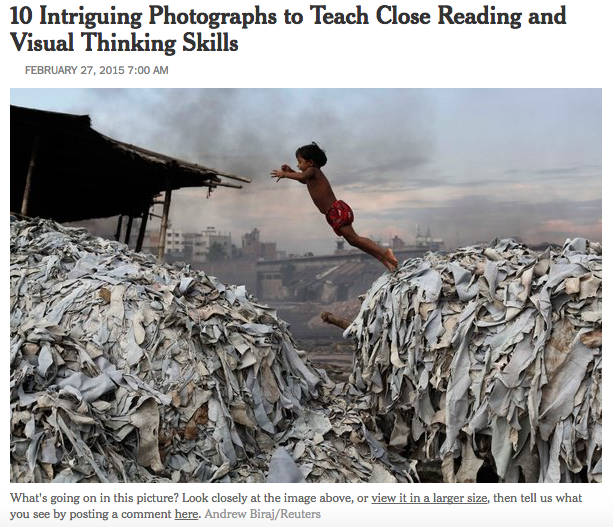
Teaching Reading and Thinking Skills with Photographs

Take a look at the 10 photographs in this New York Times article and the accompanying mini lessons to help build your students reading and thinking skills.

After you take your students through the lessons you can share more images from the New York Times section, What’s Going on in this Picture?
The Adaptable Mind

What are the skills that prepare us for a world that is constantly changing?

Isn’t this the question that all teachers want to know? This excellent 10 minute video takes the viewer through the 5 skills that we need to foster in our students.
16 Educational Podcasts

Check out these great educational podcasts from teachers, professors, innovators and skeptics where they share their thoughts about the world of education.

The podcast topics include teaching strategies, the beauty and difficulty of learning, interviews and ideas that will challenge your thinking.


Monday, 23 January 2017

Digital Bytes 23rd January 2017


Piktochart
Piktochart is a fantastic free tool that allows you to create infographics and posters very easily. Students can easily sign in with Google Drive. There are searchable icons and images you can use. This is perfect for a mathematics class or anyone presenting information or research (hint, hint … grade 5 exhibition).
MindShift.jpg
18 Digital Tools to Support Students’ Reading and Writing
Exploring a range of options for supporting students’ reading and writing is always a good idea, and the folks at Mind Shift have put together a great list of examples. Take a look and get some new ideas to refresh your literacy teaching.
Kindergarten Lego Makerspace
Librarian David Barrow talks about his journey of creating a makerspace for kindergarten students. He started with a more structured approach but eventually gave up some structure which led to more success.

After sharing some stop motion videos from older grades and giving the kindergarten students Lego, the students created their own stories and making stop motion videos. The flexibility of Lego allowed them to create stories that were meaningful to them.