Book Creator Summer Journal
A fantastic way to remember some of the details from your summer is to keep a journal. Last summer, both my kids used Book Creator to capture some of the things that happened on a daily basis. It was great for photos and video and voice records.
| |
Pages, Keynote and Numbers for iOS get over 500 Shapes
Creating infographics in Keynote or Pages just got way easier! Instead of going to the Noun Project or Flaticon, you can find icons right on your iPad or Mac with the update to the iOS iWork suite.
You can change the colours of the icons and even copy and paste them into other apps like Book Creator.
| |
|
|
Storybird
Images inspire writing - we know this to be true. Storybird helps with this process by providing hundreds of images for students to use in their writing of online, digital books. From single images, to picture books and longform books, there are a range of illustrative styles to choose from. Teachers can create class accounts, books can be downloaded or shared online, and even printed into physical books. Definitely one to check out!
|
Once Upon a Picture
Staying on the theme of images to inspire writing, Once Upon a Picture is another fantastic website you will want to bookmark. Organised into collections, such as Fiction, Inference, PSHE etc, each image comes with a series of questions to encourage students to “read” the image carefully. This approach helps when writing, but also when viewing a range of visual media. Enjoy!
|
Showing posts with label reading. Show all posts
Monday, 19 June 2017
Digital Bytes - 19th June 2017
Labels:
Book Creator,
Digital Bytes,
images,
keynote,
numbers,
pages,
reading,
StoryBird,
writing
Wednesday, 26 April 2017
Non-Fiction Text Features: Incorporating the Digital
There is so much to be gained from walking through the corridors of your school and popping in to see what classes are doing.
This morning, I happened to pop into Kim Duffy's Grade 3 class and discovered a really neat learning experience the class was exploring on Non-Fiction Text Features in digital books.
Kim had set up a Google Doc for her kids with different text features noted on the side. Students were to log onto MyOn (an online book library), and read Non-Fiction texts. They were to take a screenshot of each feature outlined in the table (see below). She had a column for the screenshots, and a column for students to explain why the feature is used.
See example of a student's work below:
Students now have a document with visual examples that they can refer back to when they create their own Non-Fiction books later on. We know that incorporating visuals helps students with retention of key information, and the fact that they actively searched for the examples of the text features will also be of benefit.
A few doors down, Daniel Withington was also looking at features of Non-Fiction text. It was great to see Grade 3 students identifying features of digital text as well, including hyperlinks, videos and search options. When Daniel's students think about writing Non-Fiction text, they will think more broadly about the features they need to consider as authors because of this introduction.It is wonderful to see teachers like Kim and Daniel naturally incorporate digital text as a part of their regular literacy lessons.
This reminds me of the arguments for teaching Digital Reading set forth in Kristin Ziemke's insightful blog post, Yes And... Thoughts on Print Versus Digital Reading. Kristin asks teachers to consider their own teaching practice:
"Take a moment to reflect:
How many minilessons have you taught this year that guide students to become effective digital readers?It is a privilege to work with teachers who can answer these questions with confidence.
Do you have anchor charts or scaffolds in place that will support them as they attempt to read digitally with independence?
Have you provided ample time for them to read diverse genres or self-select their onscreen reading material?"
Labels:
digital literacy,
online,
reading,
reading workshop
Tuesday, 7 February 2017
Podcasting our Book Club Conversations
Book Club conversations are an important part of a UWCSEA literacy education. Thinking deeply about a shared text, sharing understandings and connections, and - crucially - listening to the perspectives of others, all contributes to our reading experiences.
As teachers, we know these conversations are valuable, but we can only be in one place at one time. Listening to one group's discussions has the opportunity cost of missing out on the other conversations.
Podcasting book club conversations has a number of benefits - not least of which being teachers have the opportunity to gain an insight into more conversations.
Knowing a conversation will be recorded adds a layer of accountability for students, meaning they tend to take it more seriously. They consider their word choice more carefully, ensure they provide evidence for their assertions and listen with greater consideration.
G5 teacher Andrea McDonald began the podcasting process for her students by listening to great examples. Book Club for Kids has a whole host of age-appropriate options. They also listened to a charming episode of the Modern Love podcast called 'What it's like to fall, quite literally, in love'.
Andrea provided an A3 planning sheet for students to write sentence starters to use as prompts for their discussion. The class wanted natural sounding conversations that were largely unscripted, to give it that sense of authenticity they love when listening to podcasts.
Here are some documents Andrea created in support of the planning and preparing, including some examples of student work.
Once planning had been completed, the groups found quiet spots to record. We decided on using iMovie for easy editing later, however, GarageBand would be another great choice.
To enhance the quality of audio, we used headphones with a microphone placed in the middle of the group. Students recorded their discussion in chunks on a shared iPad and airdropped their footage to their individual laptops afterward.
One thing we learned (the hard way!) was not to record in 1080p, but to change the settings to 720p instead. We had some difficulty getting the footage to individual computers due to the sheer size of the files. The students were very patient with this frustrating aspect of the process.
Next, it was time to edit. Adding clips to iMovie was pretty straight forward, so we just showed them how to detach the audio from the video clip, and replace the image so the emphasis could be on the conversation itself.
Making decisions to cut aspects of their conversation was really hard for many! But always good practice to learn about cutting to strengthen the overall process. Most podcasts ended up between 10 - 15 minutes in length.
Below you will find a few examples of our finished podcasts. It was our first attempt, but a great learning experience for us all.
Labels:
Book Clubs,
Grade 5,
podcast,
podcasting,
reading,
reading workshop
Monday, 6 February 2017
Digital Bytes 6th February, 2017

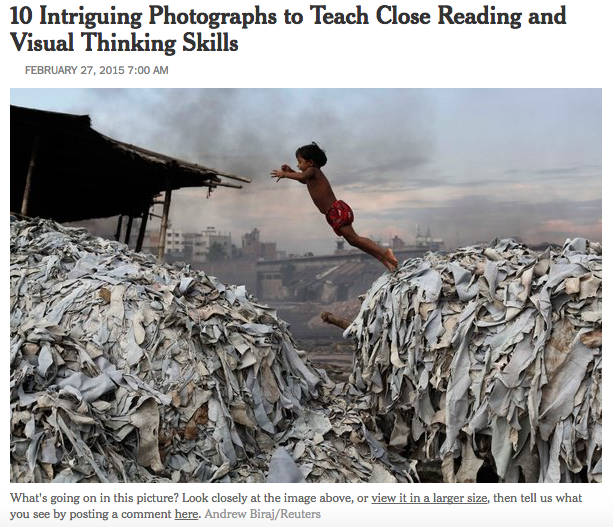
Teaching Reading and Thinking Skills with Photographs
Take a look at the 10 photographs in this New York Times article and the accompanying mini lessons to help build your students reading and thinking skills.
After you take your students through the lessons you can share more images from the New York Times section, What’s Going on in this Picture?
| |
The Adaptable Mind
What are the skills that prepare us for a world that is constantly changing?
Isn’t this the question that all teachers want to know? This excellent 10 minute video takes the viewer through the 5 skills that we need to foster in our students.
| |
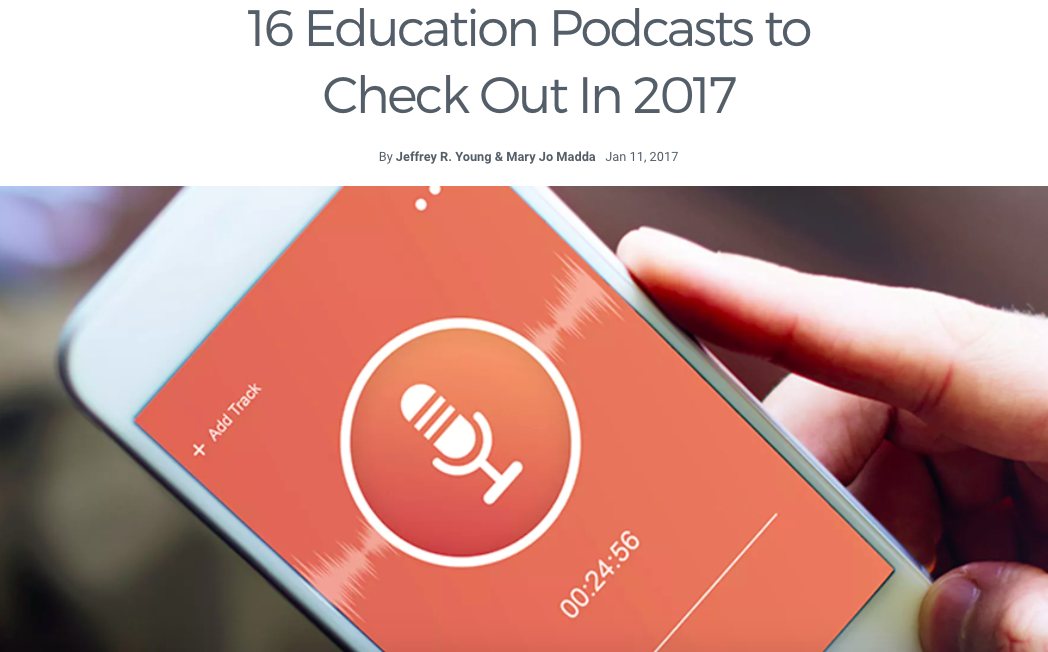
16 Educational Podcasts
Check out these great educational podcasts from teachers, professors, innovators and skeptics where they share their thoughts about the world of education.
The podcast topics include teaching strategies, the beauty and difficulty of learning, interviews and ideas that will challenge your thinking.
|
Labels:
Digital Bytes,
learning,
photography,
photos,
podcast,
podcasts,
reading,
thinking routines
Monday, 23 January 2017
Digital Bytes 23rd January 2017
Piktochart
Piktochart is a fantastic free tool that allows you to create infographics and posters very easily. Students can easily sign in with Google Drive. There are searchable icons and images you can use. This is perfect for a mathematics class or anyone presenting information or research (hint, hint … grade 5 exhibition).
| |
18 Digital Tools to Support Students’ Reading and Writing
Exploring a range of options for supporting students’ reading and writing is always a good idea, and the folks at Mind Shift have put together a great list of examples. Take a look and get some new ideas to refresh your literacy teaching.
| |
Kindergarten Lego Makerspace
Librarian David Barrow talks about his journey of creating a makerspace for kindergarten students. He started with a more structured approach but eventually gave up some structure which led to more success.
After sharing some stop motion videos from older grades and giving the kindergarten students Lego, the students created their own stories and making stop motion videos. The flexibility of Lego allowed them to create stories that were meaningful to them.
|
Labels:
Digital Bytes,
infographics,
maker,
reading,
writing
Monday, 9 January 2017
Digital Bytes 9th January 2017
Garageband in the Reading Classroom
Garageband is on our computers and iPads and this article shares a number of ways that you can use it in your reading classroom.
Whether is it capturing book talks, creating a musical accompaniment, capturing the voice of a book character in an interview or exploring the different instruments from around the world, there is something for everyone.
| |
Screencastify
Screencastify is a wonderful Chrome Extension which allows you to capture your screen and annotate as you capture the video.
You can also store the video directly in your Google Drive or save it on your computer.
| |
The Fact-Checker’s Guide for Detecting Fake News
The Washington Post has a great series of steps you can take to detect fake news. Exploring these ideas, particularly for articles shared on social media platforms is increasingly important for teachers and their students.
|
Labels:
chrome extensions,
Fake News,
garageband,
reading,
reading workshop,
Screencastify
Monday, 5 December 2016
Digital Bytes - Dec 5th, 2016

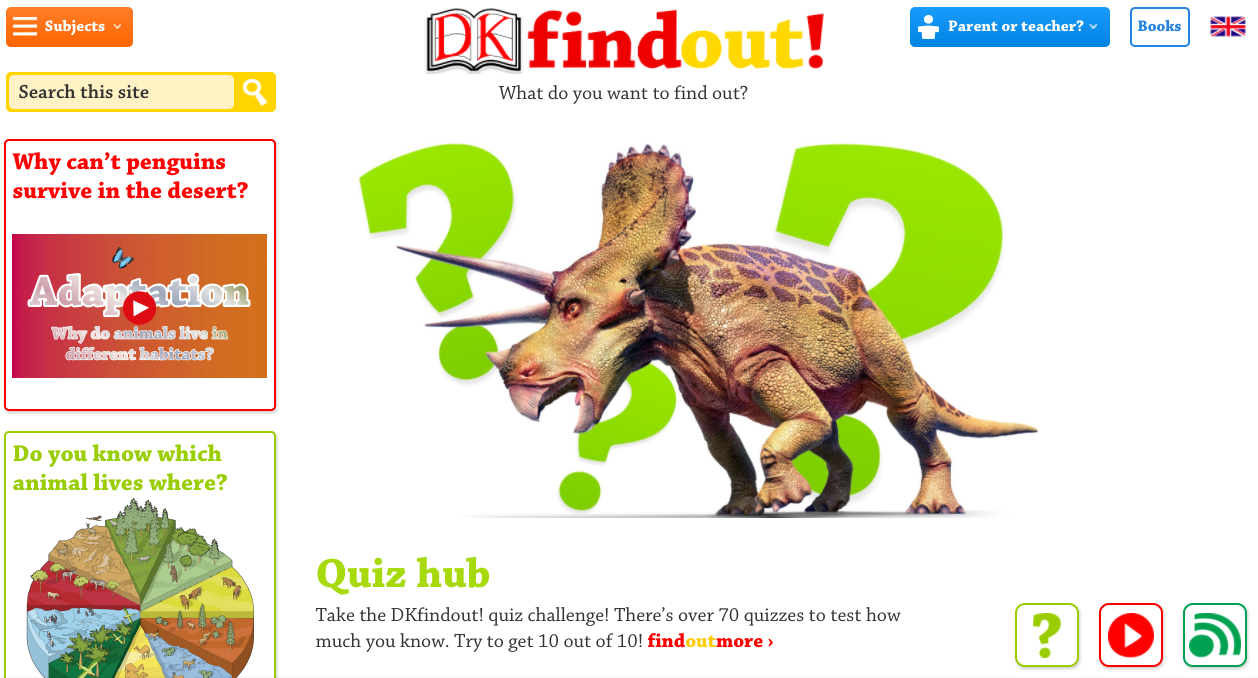
DK Find Out
DK Find Out is a fantastic site for kids to look for age-appropriate information. There are articles, diagrams, videos, fun facts and quizzes.
Like the DK books, the website is visually rich and students can use a combination of text, images and video to learn more.
| |
How Should Reading be Taught in a Digital Era?
Writer Liana Heiton states that the nature of reading has changed significantly in the past decade, however questions whether teaching practices have developed alongside. In the article How Should Reading be Taught in a Digital Era, she explores different online reading options and finishes with a quote from Katherine Hale: "But reading isn't just reading print text anymore. Reading is reading the world."
| |
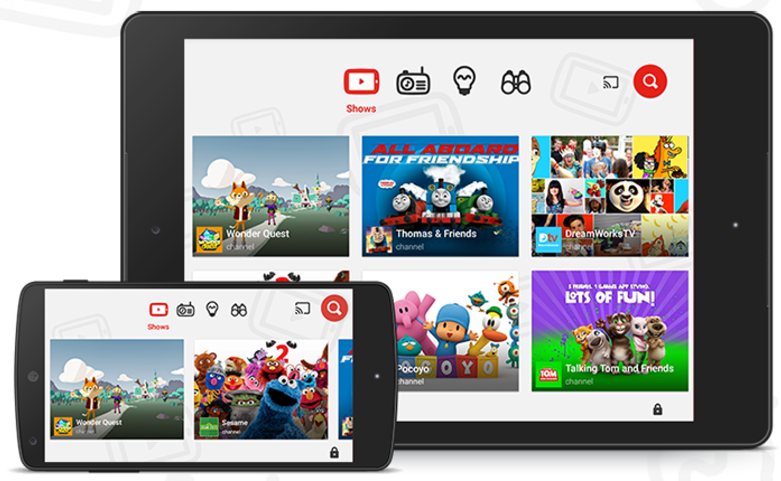
YouTube Kids
Learning something new often involves watching a video these days and our go to video site is YouTube.
YouTube kids is a free app which allows kids to search and find videos and not have to worry about advertising or inappropriate content/links.
|
Labels:
digital,
Digital Bytes,
DK Find Out,
reading,
video,
Videos,
youtube
Thursday, 1 December 2016
Ideas for Shared iPads
How lucky are we? We recently added 6 iPads to each G3-5 class, augmenting their existing 1:1 Macbook Air laptops.
Planning for valuable use of shared devices requires some creative thinking, particularly when you are used to 1:1 devices. That said, the small number of devices provides a great opportunity to differentiate for powerful learning, maximise small-group rotations and engage in collaborative activities.
Together with some of our wonderful Digital Literacy Mentors (Mike & Jocelyn), Dave and I developed some ideas about how to best manage shared devices and use them effectively to support learning.
We hope you find these tips for shared devices useful.
Monday, 25 April 2016
Digital Bytes - April 25, 2016
Hot on the heels of a great ReThinking Literacy conference, we have a number of great ideas and resources to share. This week the focus is on Visual Literacy - one of the themes that was highlighted throughout the conference.
What’s Going on in this Picture?
The New York Times has a great segment in the Learning Network called, “What’s Going on in this Picture?”
Each week, a new image is posted as a discussion prompt, with accompanying questions. More information is revealed over the week, which leads to rich conversations.
| |
This is a fantastic site for inquirers. Every day a new question is answered with a rich
You can search through previous questions or ask your own questions.
| |
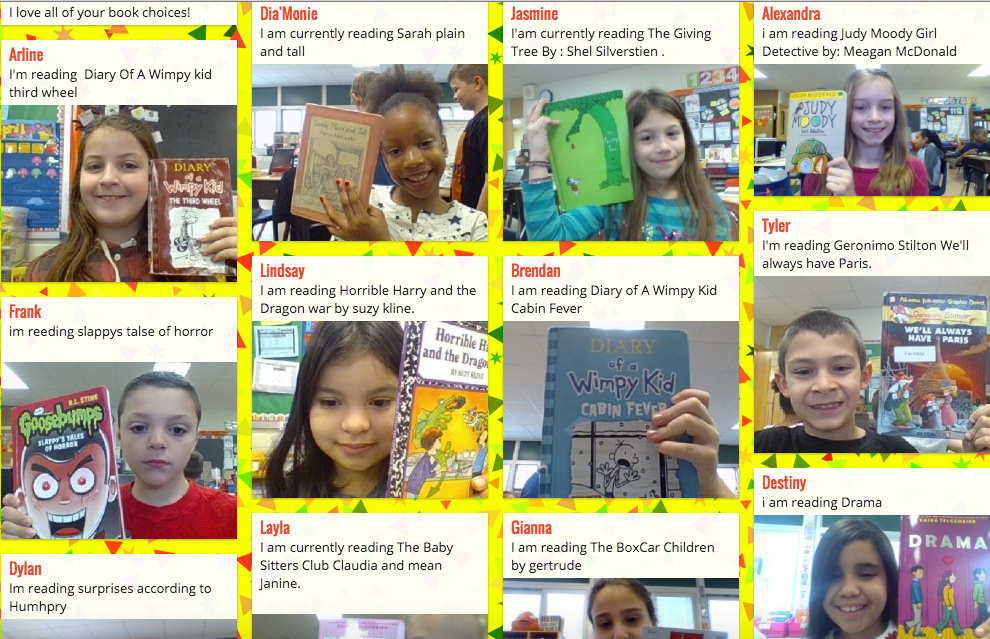
It’s Monday, What Are You Reading?
This is a great visual way to see what your students are reading. It is also a fantastic way for students to get book recommendations from others.
If you share your
|
Labels:
images,
inquiry,
photos,
reading,
reading workshop,
ReThinking Literacy,
video,
Videos,
Wonderopolis
Monday, 21 September 2015
Digital Bytes - September 21, 2015
This week's digital bytes includes articles about a free ebook on capturing digital stories, 11 quotes by famous writers and accompanying writing lessons, and using technology to help students read faster and with better comprehension.
Labels:
Digital Bytes,
iPad,
iphone,
iPod Touch,
lessons,
photography,
quote,
reading,
reading workshop,
Stories Through the Lens,
storytelling,
writing,
Writing Workshop
Monday, 14 September 2015
Digital Bytes Sept. 14, 2015
We have a fantastic set of articles in this week's digital bytes.
The first short yet extremely useful article is about using art to start student's reading. The second article is about new features in Google Drive and the third is about what digital storytelling is and isn't.
Labels:
art,
Digital Bytes,
Google Drive,
reading,
reading workshop,
storytelling
Monday, 8 June 2015
Digital Bytes June 8th, 2015
This week's Digital Bytes has a number of great articles.
There are a set of great templates for Google Slides presentations that include icons that can be manipulated in terms of size and colour .
Kick off your summer reading with 13 great Minecraft books for yourself and your students.
Finally, there is a fantastic article by Kristin Zeimke about the importance of digital reading.
Labels:
Digital Bytes,
Google Apps,
google slides,
Kristin Zeimke,
Minecraft,
reading,
reading workshop
Monday, 23 February 2015
Digital Bytes February 23, 2015
This week's focus is on reading and writing, including articles about enriching students' creative writing skills with photography and using games like Mincraft to help your child with their reading. There is also a quick tutorial to help you learn how to delete those pesky untitled posts in your Google Site.
Labels:
Google Sites,
Minecraft,
photography,
primary,
Primary Bytes,
reading,
reading workshop,
TCRWP,
writing,
Writing Workshop
Thursday, 23 February 2012
Readers Adapt Their Strategies for Reading Online
At UWCSEA East, we have been implementing Reading Workshop (also known as Reader's Workshop) to help our students develop into fluent, capable and effective readers. Our Literacy Coach Michelle Goodison has been supporting teachers in this framework, and a lot of professional development has occurred to help teachers introduce the strategies that help students best learn to read.
Increasingly, much of our reading is done online, but there is little research out there to help teachers transfer strategies from offline to online reading. Making Sense of Online Text (Educational Leadership, October 2005, Volume 63, no 2, pages 30-35) is one of the better articles I have read on the subject, but even that was written in 2005!
So what to do while the world catches up with this 'new' way of reading? Adapt our existing strategies for reading online as best we can.
We are lucky to have Mac computers at our school which have a lot of in-built features that support reading online.
We introduced three to Anne Marie's 5th Grade class, taking care to connect them to strategies they already use offline.
The three strategies we introduced were:
Avoiding distractions
We teach our students to find a comfortable place which is well-suited to reading. Online, we can easily get distracted by the visual noise of a website - the advertising, the animated gifs, the links to other pages.
Using Safari, many articles have a button called 'Reader' in the address bar. Clicking this button strips the distracting information from around the main text of the page, leaving you a clean interface to focus on.
Solve Challenging Words
Just as students collect and solve challenging words in their offline reading, we can easily define words from within Safari using the built-in dictionary. Select a word, right-click (either a two finger tap or conrol + click), and the dictionary appears with the definition, right in the web browser.
Students need to be reminded to look for the definition that most makes sense given the context of the word, as we would expect offline.
Organize Thinking
Taking notes on the main idea and supporting details in a piece of writing is also important as we read. Choosing Print, then Open PDF in Preview from the print menu, and finally clicking on the pencil icon, allows students to highlight and annotate text.
For teachers, this is particularly interesting, as the PDF can be saved together with the student's annotations, meaning you can see the effectiveness of their note-taking. This is useful in showing the progression of researching online, taking notes, and finally writing in their own words.
While we introduced these strategies to Anne Marie's class, I flipped open my laptop and captured some video of the process. I hope this helps others introduce their students to some tools that can help them read effectively online.
Increasingly, much of our reading is done online, but there is little research out there to help teachers transfer strategies from offline to online reading. Making Sense of Online Text (Educational Leadership, October 2005, Volume 63, no 2, pages 30-35) is one of the better articles I have read on the subject, but even that was written in 2005!
So what to do while the world catches up with this 'new' way of reading? Adapt our existing strategies for reading online as best we can.
We are lucky to have Mac computers at our school which have a lot of in-built features that support reading online.
We introduced three to Anne Marie's 5th Grade class, taking care to connect them to strategies they already use offline.
The three strategies we introduced were:
Avoiding distractions
![]() |
| Click image to download the original poster |
Using Safari, many articles have a button called 'Reader' in the address bar. Clicking this button strips the distracting information from around the main text of the page, leaving you a clean interface to focus on.
Solve Challenging Words
Just as students collect and solve challenging words in their offline reading, we can easily define words from within Safari using the built-in dictionary. Select a word, right-click (either a two finger tap or conrol + click), and the dictionary appears with the definition, right in the web browser.
Students need to be reminded to look for the definition that most makes sense given the context of the word, as we would expect offline.
Organize Thinking
Taking notes on the main idea and supporting details in a piece of writing is also important as we read. Choosing Print, then Open PDF in Preview from the print menu, and finally clicking on the pencil icon, allows students to highlight and annotate text.
For teachers, this is particularly interesting, as the PDF can be saved together with the student's annotations, meaning you can see the effectiveness of their note-taking. This is useful in showing the progression of researching online, taking notes, and finally writing in their own words.
While we introduced these strategies to Anne Marie's class, I flipped open my laptop and captured some video of the process. I hope this helps others introduce their students to some tools that can help them read effectively online.
Labels:
annotate,
dictionary,
digital,
how_to,
online,
reader,
reader's workshop,
reading,
reading workshop,
safari
Subscribe to:
Posts (Atom)