 |
Technology for Global Concerns
All of our older IT equipment becomes available to our GCs at UWCSEA East. Keeping in mind that the benefits of technology for learning come mainly from shifts in pedagogy, not just having equipment, the focus needs to be on both hardware and quality teaching with technology. There is a process (in beta) to support GCs who want to develop a project with your service partners. Please first talk to Dave or Keri-Lee if this is something that you are interested in pursuing. There are Macbooks, iPads and iMacs that are available.
|
 |
Kiddle
Research shows us that visuals are very important in helping us remember. The Kiddle search engine is safe search, powered by Google and has an image to accompany each of your search results. Try it out and see what you think.
|
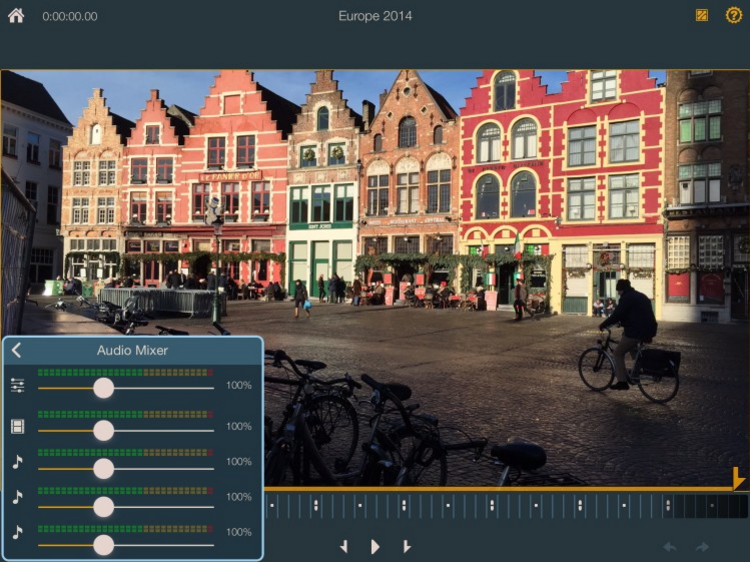 |
Video editing apps for iPhone & iPad
iMovie is a fantastic app for the iPhone and iPad but sometimes you want a little bit more control. Have a look at these 4 apps and see what they can offer you that iMovie can’t.
|

Showing posts with label research. Show all posts
Showing posts with label research. Show all posts
Monday, 1 February 2016
Primary Bytes 1st February 2016

Wednesday, 28 March 2012
5 Minutes to Safer Searching & Viewing
We always want to help our students find the most relevant information when searching or viewing content online.
Here are two great suggestions which can lead to a safer online experience for our students.
1. View Pure
www.viewpure.com is a site which allows you to 'purify' YouTube videos by stripping away the comments section and the related videos, leaving you with only the video you want students to see.
Here's a quick tutorial showing how to install and use it:
Here are two great suggestions which can lead to a safer online experience for our students.
1. View Pure
www.viewpure.com is a site which allows you to 'purify' YouTube videos by stripping away the comments section and the related videos, leaving you with only the video you want students to see.
Here's a quick tutorial showing how to install and use it:
2. Strict Filtering on Google Search
Most Google users aren't aware that the default level of filtering for search results is set to 'Moderate'. Setting the filtering to Strict, means that students are less likely to come across inappropriate content. Watch the tutorial below to see how easy it is to change:
Saturday, 12 November 2011
The ups and downs of social networks - new research.
 |
| Trimpers Cobra Roll by Scott Ableman/ |
The main aim of the survey was, as stated by the report:
As they navigate challenging social interactions online, who is influencing their sense of what it means to be a good or bad “digital citizen”? How often do they intervene to stand up for others? How often do they join in the mean behavior?The results where compiled from 799 12-17 year-olds living in the United States. Though I believe there would be some differences in our population of students at UWCSEA, I do expect the major trends to be similar. 95% of the respondents reported being online and 80% of that group participate in social networks, the most dominant of those, of course, is Facebook (93%).
69% of social media-using teens report that their interactions are mostly kind. They reported that social networks make them feel closer to people they interact with and make them feel better about themselves.
Not surprisingly, there are plenty of bad experiences reported by the teens in the survey. 88% report witnessing cruel or mean behavior, though mostly they say it only happens "only once in a while." One in five teens say they themselves were bullied within the last 12 months, though this language has questionable meaning with teens who often refer to this kind of behavior as "drama." Most commonly, the bullying happened in person and to a lesser extent in other ways including (in order greatest to least) via text message, online, or by phone.
If teens experience meanness, cruelty, or bullying online, we suggest they:
- Don't respond.
- Save evidence by taking a screen shot.
- Block the person and report them for abuse to the service provider.
- Tell a trusted adult (parent, teacher, counselor, tutor, etc.)
Returning to the original question about who is influencing the behavior of teens online, the respondents point first to parents followed by teachers as being influential sources of information on digital citizenship. We are the people they look to above other sources to learn how to behave appropriately and for advice when they have negative experiences.
Here are some resources that can help guide those conversation:
What has worked for you and your family?
Thursday, 6 October 2011
Parent Coffee Morning 1: Social Networks
The Digital Literacy Team at East is pleased to welcome parents to our first Coffee Morning - this time focusing on: Social Networks: Why they matter, and how you can help your child develop a positive online presence.
We looked first at what was worrying you about Social Networks. Here is a wordle which shows your concerns:

 How much time with technology is too much? What's appropriate for a child at a particular age? The answers to these questions will be different for every family, and depend on a variety of factors - making it a difficult one to answer!
The DLT team recommends having a discussion with your child about what is reasonable. Homework, outdoor play, relaxation etc are some of the considerations to think about. Obviously the age of the child makes a difference too.
 One concern we hear often from parents is the worry that students will be contacted by strangers, who may try to track them down and possibly attempt to meet them. The statistical probability of this actually happening is very low.
Dr. David Finkelhor (director of the Crimes against Children Research Center), in a panel discussion entitled 'Just the Facts About Online Youth Victimization' states,
 Part of learning to work effectively in the 21st Century involves managing distractions. Recognizing that homework may take longer if you are distracted, and taking steps to reduce that distraction is an important part of growing up for today's students.
Some of the suggestions we gathered from students, parents and teachers may help:
- Put your Skype on invisible so others think you are offline.
- Turn off Chat in Facebook/Google Chat
- Turn off Twitter notifications (or turn it off entirely)
- Work in a public place (e.g. Kitchen table), so other people can keep you on task
- Take regular breaks
- Set targets and reward with social networking check-ins
- Make homework a family time, where everyone works at the same time
- Work in Fullscreen view, to eliminate 'visual noise'
- Download Self Control, an OSX app that allows users to block certain websites for predetermined time periods.
 At UWCSEA we are of the opinion that educating students about what to do when coming across inappropriate content is the most effective long-term strategy. We can't control what people put on the Internet, but we can control our reaction to it.
As part of our school-wide focus on Digital Citizenship, teachers discuss strategies students can use if/when they come across inappropriate content. Some suggestions include:
- Closing the window
- Covering it with your hand
- Changing your search terms
- Letting a teacher know
- Scrolling down the page
- Hitting the 'back button'
We encourage students to be responsible, and not make a big fuss - the worst thing they can do is to draw attention to it.
Image Credits
cc licensed ( BY ) flickr photo by zoutedrop: http://flickr.com/photos/zoutedrop/2317065892/
cc licensed ( BY NC ND ) flickr photo by nuclear dwarf: http://flickr.com/photos/kafkapie/4182398090/
cc licensed ( BY NC SD ) flickr photo by escapedtowisconsin: http://flickr.com/photos/69805768@N00/3292899689/
cc licensed ( BY NC ND ) flickr photo by gadgetgirl: http://flickr.com/photos/gadgetgirl70/136334749/
We looked first at what was worrying you about Social Networks. Here is a wordle which shows your concerns:

The Digital Literacy Team has looked carefully at these. We have examined recent research, talked with students and other parents and teachers to put together some information regarding these issues. We hope you can see your concerns as opportunities to open the doors of communication with your child.
1. Time

The DLT team recommends having a discussion with your child about what is reasonable. Homework, outdoor play, relaxation etc are some of the considerations to think about. Obviously the age of the child makes a difference too.
We advocate a balanced approach, where screen time is only part of a set of varied after school activities.
Common Sense Media has some great articles on managing screen time:
2. Contact with Strangers
One concern we hear often from parents is the worry that students will be contacted by strangers, who may try to track them down and possibly attempt to meet them. The statistical probability of this actually happening is very low. Dr. David Finkelhor (director of the Crimes against Children Research Center), in a panel discussion entitled 'Just the Facts About Online Youth Victimization' states,
"Our research, actually looking at what puts kids at risk for receiving the most serious kinds of sexual solicitation online, suggests that it’s not giving out personal information that puts kid at risk. It’s not having a blog or a personal website that does that either. What puts kids in danger is being willing to talk about sex online with strangers or having a pattern of multiple risky activities on the web like going to sex sites and chat rooms, meeting lots of people there, kind of behaving in what we call like an internet daredevil."For more information, you might like to read the following articles:
3. Digital Footprint
A digital footprint is not necessarily something to fear! Will Richardson, writing for the journal Educational Leadership states:
As the geeky father of a 9-year-old son and an 11-year-old daughter, one of my worst fears as they grow older is that they won't be Googled well. Not that they won't be able to use Google well, mind you, but that when a certain someone (read: admissions officer, employer, potential mate) enters "Tess Richardson" into the search line of the browser, what comes up will be less than impressive. That a quick surf through the top five hits will fail to astound with examples of her creativity, collaborative skills, and change-the-world work. Or, even worse, that no links about her will come up at all. I mean, what might "Your search did not match any documents" imply?
We want to help students develop a positive online presence, ensuring they understand the 'stickiness' of online information, and how to make good decisions about what is shared publicly.
4. Distractions
 Part of learning to work effectively in the 21st Century involves managing distractions. Recognizing that homework may take longer if you are distracted, and taking steps to reduce that distraction is an important part of growing up for today's students.
Some of the suggestions we gathered from students, parents and teachers may help:
- Put your Skype on invisible so others think you are offline.
- Turn off Chat in Facebook/Google Chat
- Turn off Twitter notifications (or turn it off entirely)
- Work in a public place (e.g. Kitchen table), so other people can keep you on task
- Take regular breaks
- Set targets and reward with social networking check-ins
- Make homework a family time, where everyone works at the same time
- Work in Fullscreen view, to eliminate 'visual noise'
- Download Self Control, an OSX app that allows users to block certain websites for predetermined time periods.
Common Sense Media's article on Managing Multitasking provides suggestions at different age levels, which you may find a helpful starting place.
5. Access to Inappropriate Content
As part of our school-wide focus on Digital Citizenship, teachers discuss strategies students can use if/when they come across inappropriate content. Some suggestions include:
- Closing the window
- Covering it with your hand
- Changing your search terms
- Letting a teacher know
- Scrolling down the page
- Hitting the 'back button'
We encourage students to be responsible, and not make a big fuss - the worst thing they can do is to draw attention to it.
6. Kids Knowing More Than You
The short answer is, they probably do! That doesn't mean they don't require teacher/parental support in using technology.
You can help by staying interested in what your kids are doing. If they are interested in a particular game, ask them to teach you how to play. Talk to them about what they like to do. Share your favourite YouTube videos. Just keep the conversations going!
Image Credits
cc licensed ( BY ) flickr photo by zoutedrop: http://flickr.com/photos/zoutedrop/2317065892/
cc licensed ( BY NC ND ) flickr photo by nuclear dwarf: http://flickr.com/photos/kafkapie/4182398090/
cc licensed ( BY NC SD ) flickr photo by escapedtowisconsin: http://flickr.com/photos/69805768@N00/3292899689/
cc licensed ( BY NC ND ) flickr photo by gadgetgirl: http://flickr.com/photos/gadgetgirl70/136334749/
Monday, 19 September 2011
5 Fab Ideas for Effective Online Research

One of Kathleen's many strengths is in Literacy, and she has given us lots of handy hints to do with helping students make sense of online texts, research techniques and some strategies for developing effective research skills.
Many of her ideas come from this great article 'Making Sense of Online Text' which is extremely relevant today, even though it was written in 2004!
Please know that the following Fab Ideas for Effective Online Research are Kathleen's - I am merely sharing them around.
1. Start with images

2. Narrow search by Reading Level
A neat little addition to the 'more tools' section of the Google search results is the ability to search by reading level. I'm not sure how, but I had missed this gem.

3. Scaffold
Our Grade 6 students have been researching about the UWC movement and the other UWC schools around the world. They worked collaboratively on Google Docs to find information under various categories, with the view to making a Keynote presentation later on.Although the teachers took care to direct students to retain the URL of their sources etc, the Google Docs quickly became a receptacle for work that had been copied and pasted. Kathleen got the students to set up a table in Pages to help summarize and organise their data. This helped bridge the gap between the 'research' and the Keynote.
Too often, students are not provided with enough scaffolding, and as a result, the finished product lacks a depth of understanding. This scaffold will help our students be more successful in their presentation.

4. Summarize & Transform
As part of the scaffolding process, students were asked to summarize their findings into bullet points, which was a great start of course. Where I think Kathleen really raised the bar was when she asked the kids to transform their notes into audio form. The process of transforming written text into a different form (in this case, audio) really made them think about what they had learned, and what was important. It helped put the notes into their own words and moved them away from copying.
Throughout her time at UWCSEA, Kathleen used the technique of transforming text. Occasionally it was creating/finding an image that represented a particular word, sometimes it was a movie recording, sometimes audio. I will definitely be adding this technique to my research toolbox.
5. Search Stories
How do you assess a student's search skills? When Kathleen asked this question to a group of teachers, it certainly made them stop and think. Typically, the skills of searching and synthesizing are seldom assessed, and instead, the quality of a summative task/presentation becomes the assessment.Using screen capture tools (e.g. Quicktime player) or a specially created video tool to help with the process, students can record their screen and show the process they use to search for relevant information. Google calls these 'Search Stories' (see amusing example here).
[Although this post is primarily about researching, it would be remiss of me not to mention that Search Stories could be used as a basis for literacy - developing storylines, uncovering the plot with each new search category, character development...]
I would like to thank Kathleen for all her support, ideas and above all, her warmth! I hope you find these ideas as useful as we have.
Image credits:
Kathleen Coaching by Keri-Lee Beasley
Volcano Erupting ( BY NC SD ) by kahunapulej
UWCSEA by Keri-Lee Beasley
Singapore map via Google Maps
Subscribe to:
Posts (Atom)