As educators, we know that plagiarism is wrong, and we are very careful to share that message with our students. However, if you take a look at the pictures and images on display in most schools and classrooms, you will (probably) find hundreds of images that remain
uncredited.
Why is it that so many of us think this is ok?
 Legally
, educators could argue that their usage falls under 'fair use' terms of copyright in educational settings. At UWCSEA (and many other leading schools), we believe that
ethically, we have a responsibility to teach students (and teachers!) about
academic honesty and what
Rodd Lucier terms "
creative integrity."
To this end, we encourage our students to:
1.
create their own content first.
2. If this is not possible, we recommend searching for
Creative Commons licensed content.
3. If they still can't find what they are looking for, the next step is to use a copyright image with permission from the original creator.
4. Only once they have exhausted the above steps, will we accept the use of copyright images, with attribution.
(For a PDF of the respecting creative work poster, please click here)
What is Creative Commons?
Creative Commons is a non-profit organisation that provides alternative licenses to Copyright. Creative Commons licences allow individuals to identify how they wish their content to be attributed, reused, remixed and/or shared.
Mission
"Creative Commons develops, supports, and stewards legal and technical infrastructure that maximizes digital creativity, sharing, and innovation."
Vision
"Our vision is nothing less than realizing the full potential of the Internet — universal access to research and education, full participation in culture — to drive a new era of development, growth, and productivity."
What are the Creative Commons Licences?
Attribution
You let others copy, distribute, display, and perform your copyrighted work - and derivative works based upon it - but only if they give you credit.
Non-Commercial
You let others copy, distribute, display, and perform your work - and derivative works based upon it - but for noncommercial purposes only.
Share Alike
You let others copy, distribute, display, and perform only verbatim copies of your work, not derivative works based upon it.
No Derivatives
You allow others to distribute derivative works only under a license identical to the license that governs your work.
The licenses may be used in conjunction with each other, for example:
This licence means you are allowed to redistribute, both commercially and non-commercially, as long as it is passed along unchanged and in whole, with credit to you.
More information on the licenses can be found
here. Details on how to license different types of content (multimedia and more) can be found
here. The video below is a very clear explanation of the licences in action.
How and Where do I search for Creative Commons Licensed Content?
The most straightforward source for Creative Commons Licensed content is to use the Creative Commons search engine. This way, you can select whether you're looking for images, music or video.
Searching for Images
Flickr Advanced Search is my favourite place to find Creative Commons images, however you
must remember to select the box underneath which says 'Only search within Creative Commons-licensed content' (see below), or you will just be carrying out a regular Flickr search.
Picol &
The Noun Project are both great for searching for icons - perfect if you are creating an infographic or presentation.
Searching for Music
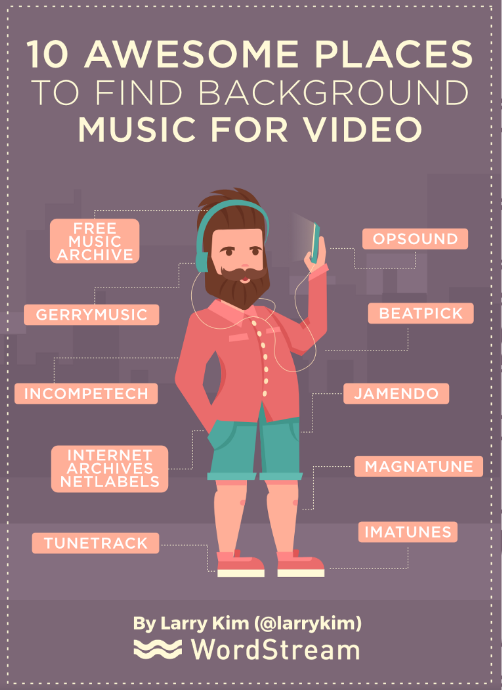
There are a number of great sites for finding creative commons music. Check out the ones below:
Searching for Video
Most video sites now have an option for users to upload their content under Creative Commons licenses. Searching through the
Creative Commons Search site is still the best bet though.
Using
YouTube editor you can select the CC tab to search within Creative Commons licensed content on YouTube. This is good for remixing videos.
Vimeo allows you to search for creative commons licensed videos. Choose which license you would like to find content under, then click browse. From there, click the magnifying glass to search within results.
How do I reference Creative Commons Licensed Content?
There is a lot to remember in referencing Creative Commons licensed content (which I will outline below), but the good news is it is becoming easier and easier to do so.
You need to:
- Include the title of the work
- Credit the creator of the work
- Provide the URL where the work is hosted
- Include the type of license, and a link to the license conditions*
*if relevant, any copyright notices need to remain intact too.
Many of these details can be easily sourced from the Creative Commons website, together with the location of the work in question.
Alan Levine created a fantastically helpful Google Chrome Extension called
Flickr CC Attribution Helper that integrates with Flickr to generate attribution strings for Creative Commons licensed photos.
Installing Flickr CC Attribution Helper in Chrome from
UWC South East Asia on
Vimeo.
You just copy and paste either the html code (if you want it on a website), or the plain text (for presentations & other print media).
There are several guides which have more detailed information on referencing Creative Commons Licensed content. Click
here and
here for more information.
How do I License my own Content under a Creative Commons License?
There is a very handy License Chooser at
http://creativecommons.org/choose/ which guides you through the process of selecting the right license for your needs.
You can then get text or html versions of the license to put on your work.
Why Creative Commons?
I believe in the value of sharing. In education, sharing is crucially important. By using Creative Commons content, and licensing our content as Creative Commons, we show our students that we are willing to assist others, share what we create, and acknowledge the input of others. Pretty important messages, in my opinion.